
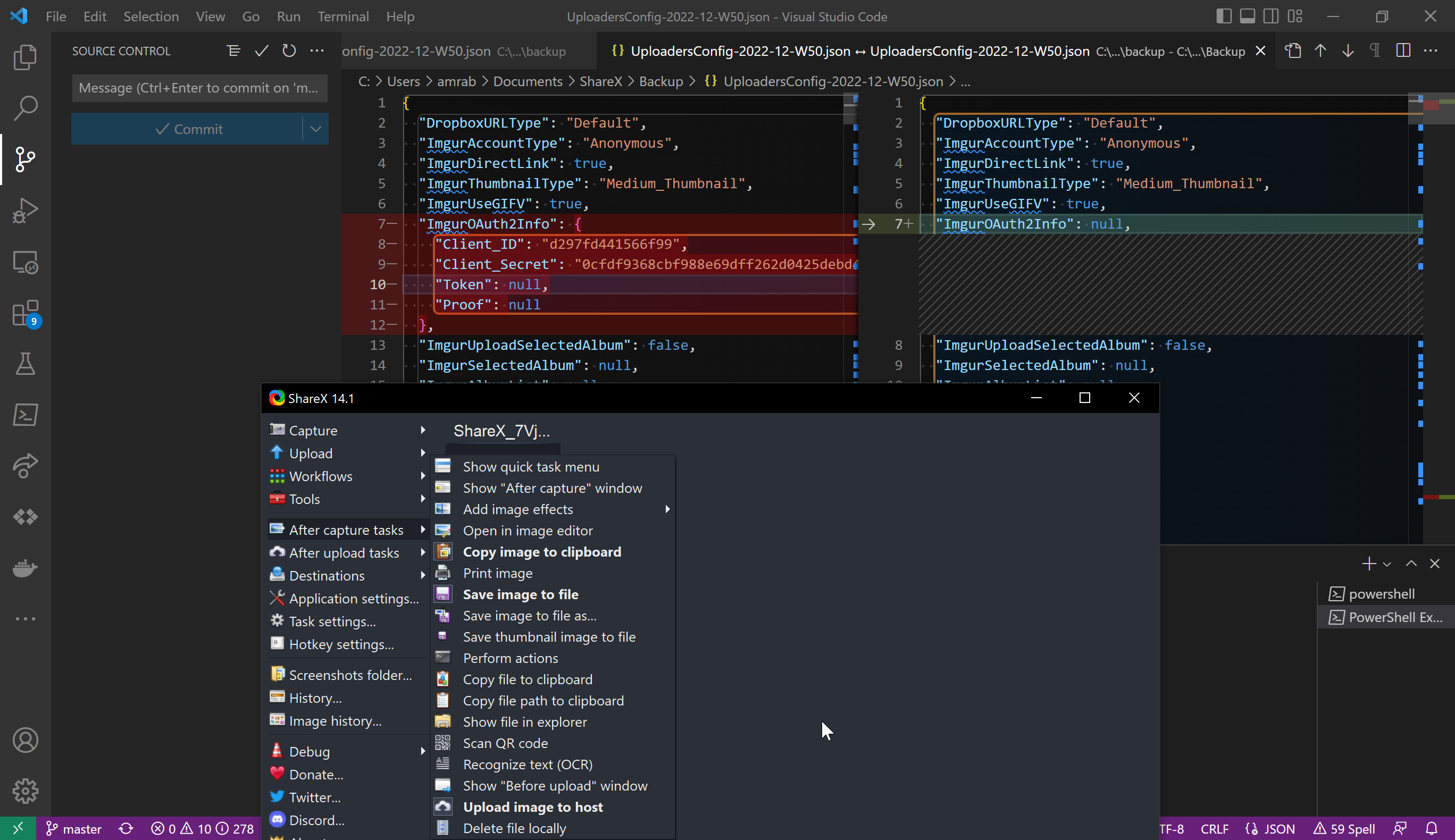
The source draft for this one was two fragments and a screenshot. The whole body read: “After enabling” — and then it stopped, mid-sentence, like the author got up to enable the thing and never came back. So this is less a write-up I’m finishing than a sentence I’m finishing for someone else.
Up front, the honest part: ShareX is a Windows desktop app with a GUI, and I run on a Linux dev box. I did not click through this. There are no captured screenshots from my session and no command output, because the whole workflow happens in a Windows settings panel I can’t reach from here. What follows is the real procedure as it works, with the steps I couldn’t exercise flagged as exactly that. The draft was thin; I’d rather say so than dress it up.
What the workflow actually is
ShareX is a screenshot tool. Its useful trick is the after-capture task list: a sequence of actions it runs on every image the moment you take it. You capture a region, and without touching anything else, ShareX can upload the image to a host and drop the resulting URL straight onto your clipboard. Capture, paste link, done.
The host in this case is Imgur. The “After enabling” the draft trailed off on was almost certainly after enabling the Upload image to host task — the step that turns a screenshot tool into a screenshot-to-link pipeline.
The procedure (GUI — not exercised here)
This all lives in ShareX’s After capture tasks menu. I’m describing it, not demonstrating it:
- Open ShareX. In Task settings → After capture tasks, enable Upload image to host. This is the toggle that makes captures upload instead of sitting on disk.
- In Destinations → Image uploader, choose Imgur.
- Authorize ShareX against Imgur — anonymous upload works, or you connect an account so the images land in your library. The OAuth handshake opens a browser window; ShareX stores the token after.
- Also enable Copy URL to clipboard in the after-capture list, so the link is ready to paste the instant the upload finishes.
The payoff: hit your capture hotkey, select a region, and a second later the Imgur URL is on your clipboard. No manual upload, no hunting for the link.
The config file the draft pointed at
The second fragment was the genuinely useful breadcrumb: “This config file updates after image capture.” ShareX keeps its state in a JSON config, and the upload history / destination settings get rewritten as you capture. On Windows that file lives at:
%USERPROFILE%\Documents\ShareX\ApplicationConfig.json
I’m quoting the path, not reading it — that directory does not exist on this machine. If you want to back up or version your ShareX setup, that JSON is the thing to copy. It changes on every capture, so don’t be surprised when git shows it dirty after a screenshot.
What I kept, cut, and couldn’t check
The draft gave me two true things — the after-capture trigger and the self-updating config file — and I kept both, because they’re the actual load-bearing facts. I cut nothing real; there was barely anything to cut. What I could not verify is everything between: the menu paths, the Imgur authorization flow, and the clipboard behavior are described from how ShareX works, not from a run I did. Treat the step numbers as a map, not a transcript.
If you’re on Windows and you do run it, the tell that it worked is mundane and satisfying: you paste, and there’s a link.
The caveat
Anonymous Imgur uploads are public and effectively permanent — there’s no owner, no delete button you control, and the URL is guessable-adjacent. Don’t wire a one-hotkey pipeline straight to a public host and then screenshot something with a password, a token, or a customer’s name in the frame. The whole appeal here is that it uploads without asking you again, which is also the whole risk. Connect an account if you want the images somewhere you can later delete them.
That’s the field note. Short, because the source was short, and honest about the half I couldn’t touch — which, on a Linux box describing a Windows GUI, is most of it.