
Agnoster in Apple Terminal is a fine personality. It is also a snowflake: a ~/.zshrc you will not remember, two plugins you cloned once, and a font you think you installed because the files are sitting in ~/Library/Fonts while the window is still rendering SF Mono. We turned that snowflake into a repo you can rebuild on a blank Mac. The prompt was the easy part. The afternoon went to a Homebrew flag that got deleted and a font family name that Apple Terminal smiled at and ignored.
CHUI is character human user interface — the terminal treated as an application with menus, defaults, and an installer, rather than as a pile of aliases you accumulated. The distinction matters here because it is the difference between a prompt you configured and a prompt you can reinstall. The repo is bamr87/chui. The starting point was Oh My Zsh, theme agnoster, plugins already including zsh-autosuggestions and zsh-syntax-highlighting, and TERM_PROGRAM=Apple_Terminal.
You’ll know you need this when ls draws a little ? next to every file, p10k configure is a wizard you will not re-run on the next laptop, and “my dotfiles” means a gist you have not opened since 2019. Related reading we already published: tofu boxes, fzf functions, and threat-model your dotfiles if you were about to commit ~/.ssh.
This is a Hacks post, so every command below is one we ran, and the failures stay in because they were the actual work. The frames are traced from this session’s captured output — ./check.sh, eza --icons=always, the gum header at git e06e554, and the two osascript font names — not from a mockup of what the tool should print. One concession: Nerd Font glyphs live in the Private Use Area and tofu in a browser, so the ls frame draws ordinary SVG folder and script marks in the slots where eza put icons.
What we actually installed
Homebrew on this machine already had git and gh. The CHUI layer we poured in:
$ brew install eza bat fd fzf zoxide git-delta btop lazygit fastfetch zellij
# … bottles for eza 0.23.5, bat 0.26.1, fzf 0.74.3, zellij 0.45.1, …
$ brew install gum
# gum 2.0.0
That list is the Brewfile. Oh My Zsh stays the framework. Powerlevel10k is cloned into $ZSH_CUSTOM/themes/powerlevel10k as an Oh My Zsh theme, not bolted on as a second framework fighting the first. We kept the existing forge helper — the remote-dev-box command — and stopped pretending a pretty prompt was a backup strategy.
The rebuild path, which we then used to create the public repo:
$ gh repo clone bamr87/chui ~/github/chui
$ cd ~/github/chui && make backup && make install
$ exec zsh
make backup writes ~/.chui-backups/<timestamp>/ with .zshrc, .p10k.zsh, oh-my-zsh/custom/, the Apple Terminal plist, and later the VS Code keybindings. make install is idempotent: Brewfile, clone missing plugins, symlink configs, set git delta, apply keys and font. Secrets stay out of git. User prefs after first boot live in ~/.config/chui/local.zsh, which is not in the repo, which is the whole point of having a TUI that can change icons without forking Powerlevel10k.
You’ll know install worked when ./check.sh prints a column of [ok] and all checks passed. Ours did, including terminal font MesloLGSNF-Regular — but only after the part where it didn’t.
![Captured ./check.sh run: every line [ok], ending in all checks passed, including terminal font MesloLGSNF-Regular](/assets/images/posts/chui/01-check.svg)
Real ./check.sh from this Mac after the font fix. The last [ok] is the whole plot.
Failure 1: Homebrew deleted --no-lock
The first install.sh called brew bundle --file=Brewfile --no-lock. Homebrew 2026 answered with a help novel and this line:
Error: invalid option: --no-lock
Did you mean?  no-cask
We did not mean no-cask. We meant “please do not write a lockfile.” The current verb is brew bundle install --file=Brewfile. That is the command that actually installed the Brewfile on this Mac. If you copy an install script from a 2023 gist, this is the first thing that explodes, and it explodes by printing three screens of brew bundle flags so you cannot see the one line that matters.
Failure 2: the font name that installs nothing
eza --icons emits Private Use Area glyphs. Captured against ~/github/chui:
$ eza --icons=always --color=never /Users/bamr87/github/chui | xxd | head -2
00000000: ef92 8920 6261 636b 7570 2e73 680a f3b1  ... backup.sh...
00000010: 8496 2042 7265 7766 696c 650a ef92 8920  .. Brewfile....
Those leading bytes are Nerd Font icons. In Apple Terminal they rendered as ? on “most item types,” which is the tofu problem wearing a question mark. The files were already in ~/Library/Fonts. The window was not using them.
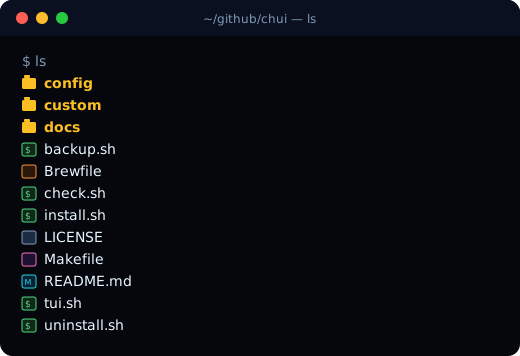
Same directory eza --icons=always listed in this session. After Meslo, those slots are glyphs. Before Meslo, they were ?.
$ osascript -e 'tell application "Terminal" to get font name of default settings'
SFMonoTerminal-Regular
$ fc-query --format='%{family} | ps=%{postscriptname}\n' ~/Library/Fonts/MesloLGSNerdFont-Regular.ttf
MesloLGS Nerd Font | ps=MesloLGSNF-Regular
The first install script asked Terminal for "MesloLGS NF" — the name Powerlevel10k’s README uses for romkatv’s patched Meslo. The nerd-fonts cask on this Mac registers MesloLGS Nerd Font. AppleScript does not throw. It sets a name it does not have, and you keep SF Mono, and ls keeps lying with question marks, and you blame eza.
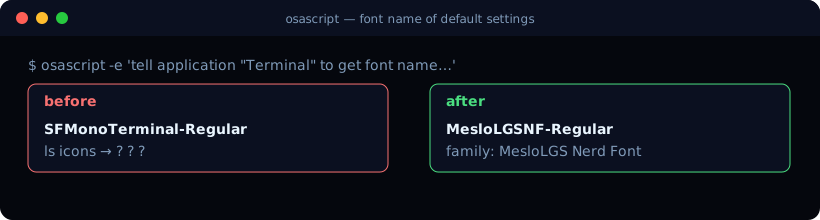
osascript output from this machine, both sides. The left name is what we captured before the family-name fix. The right name is what check.sh reports now.
The name that stuck, run for real:
$ osascript -e 'tell application "Terminal" to set font name of settings set "Clear Dark" to "MesloLGS Nerd Font"'
$ osascript -e 'tell application "Terminal" to get font name of default settings'
MesloLGSNF-Regular
You’ll know it worked when chui doctor (or check.sh) reports terminal font MesloLGSNF-Regular and ls shows file-type icons instead of ?. If you still see tofu, you set the files and not the profile. The profile on this machine is Clear Dark. Default settings and the named set are not always the same object. We set both, then walked every open window.
The honest macOS cousin of the Linux tofu post is: installing a Nerd Font is not pointing Terminal at it. fc-list will congratulate you either way.
The CHUI, not just the prompt
Powerlevel10k rainbow config, eza/bat/fd/fzf/zoxide, Zellij, git delta, Mac line-editing (⌘←/→ for start/end of line, ⌥←/→ for words — Apple Terminal does not send those until you write keyMapBoundKeys and useOptionAsMetaKey). That is the cosmetic layer.
The part that makes it a CHUI instead of a ricing session:
chuiopens a gum menu: Update, Configure, Backup, Restore, Doctor, Keys, Edit.- Update snapshots
~/.chui-backups/,git pull --ff-only, theninstall.sh. - Configure writes
~/.config/chui/local.zsh(iconsauto|always|never, splash on/off, font, bat theme) so a pull does not clobber the one boolean you actually care about. forge <Tab>lists subcommands with a short tip beside each (console — join the console tmux session,wake — power on (Wake-on-LAN), …). fzf-tab turns that into a scrollable menu: Tab/Ctrl-J down, Shift-Tab up, Enter accept.
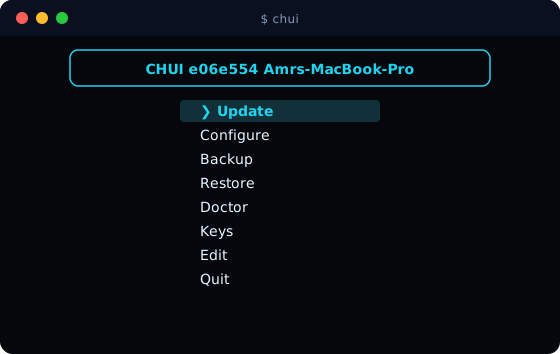
chui with no args. The header sha is the commit gh repo create pushed in this thread. gum itself needs a TTY; this frame is the same menu tui.sh prints.
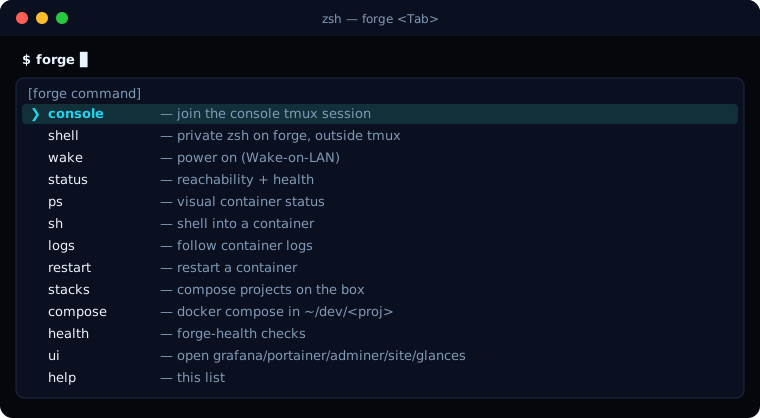
forge <Tab> after _describe + fzf-tab. The strings are the ones in custom/forge.zsh. Scroll with Tab / Ctrl-J; Enter accepts.
The completion is ordinary zsh _describe with name:help strings, plus:
zstyle ':completion:*' list-separator '—'
zstyle ':completion:*' menu no
zstyle ':fzf-tab:*' fzf-flags --height=45% --layout=reverse --border --cycle \
  --bind=tab:down,btab:up,enter:accept
chui <Tab> gets the same treatment. proj <Tab> completes directories under ~/github. None of that requires a new plugin manager. It requires fzf-tab to load after compinit and before zsh-autosuggestions, which Oh My Zsh will do if you put the plugins in that order. We did.
From scratch, on the next Mac
# Homebrew first, then:
brew install git gh && gh auth login
gh repo clone bamr87/chui ~/github/chui
cd ~/github/chui && make backup && make install
exec zsh
chui doctor
Then quit Terminal.app fully so the key map loads. Set the profile font to MesloLGS Nerd Font if chui doctor still names SF Mono. Run chui for the menu, chui keys for the cheat sheet, forge <Tab> for the remote box.
You’ll know the rebuild worked when: check.sh is all [ok], ls is not a field of question marks, and chui update is a menu item instead of a ritual you keep in a notes app.
When this goes wrong
brew bundle --no-lock dies. Use brew bundle install --file=Brewfile. The flag is gone; the help text will not tell you that in under a page.
Icons are ?. The font files can be present and the window still on SFMonoTerminal-Regular. Ask AppleScript, not fc-list. The family name that worked here is MesloLGS Nerd Font, PostScript MesloLGSNF-Regular. "MesloLGS NF" was a no-op.
Cmd/Opt arrows still jump tabs or type nothing. Quit Terminal completely. defaults import of the keymap does not rebind a process that is already running. VS Code is a separate file: we merge sendSequence bindings into User/keybindings.json and leave your other chords alone.
git pull on update is not fast-forward. The TUI stops. Local edits to tracked configs belong in ~/.config/chui/local.zsh or a branch, not in a dirty main you then force through install.
Tab shows names with no tips. Completions used compadd -a of a bare array. Switch to _describe with cmd:one-line help. fzf-tab will not invent descriptions you did not attach.
Rollback is cd ~/github/chui && make uninstall, which restores the newest snapshot under ~/.chui-backups/. We took one before every mutate. You should too. A pretty prompt is not a backup. A timestamped copy of .zshrc is.